DynoJet PowerCommander II / III / IIIusb / III r
/ V
DynoJet Quick Shifters & Ignition Module
What
is a Power Commander II / III /IIIusb / III r a.k.a. (PCII /
III) ?
The
PC is a fuel injection and ignition timing (on some models)
adjustment unit that plugs "inline" with the bikes' stock ECU. The
PC uses original equipment style connectors so that no splicing or
cutting of the harness is required. Most installations take less
than 15 minutes, some as little as 5 minutes. Changes are made to
the bikes fuel and ignition curves via the PC's onboard
microprocessor. Using this technology we are able to offer a large
area of adjustment without making any permanent changes to the
bikes' ECU (electronic control unit). Removing the PC returns the
bike to its previous stock condition. The Power Commander can be
ordered preprogrammed with a your choice of several settings, based
on the modifications to your bike. The unit also comes complete with
software and cable link that allows you to change between different
maps or make adjustments to a map file.
How
Much Power Will It Give Me ?
Well
that can depend upon many things but what we can tell you is "The
perfect air/fuel ratio will ensure that the engine can produce the
maximum possible horsepower for that given combination". We must
also understand that a typical street rider spends a great deal of
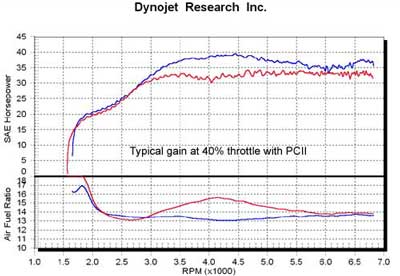
time riding in part throttle conditions. Shown below are two graphs
of a motorcycle before and after installation of the Power Commander
. The top graph shows the horsepower curve accelerating at a 40%
throttle opening and the lower graph shows the corresponding air /
fuel ratio. You can see a large horsepower increase between the two.
The red curve shows a typical stock motorcycle with minor
performance modifications (slip-on exhaust). The blue curve shows
that same combination with the PC installed and you can see that the
line is nearly straight. So the rider will feel a large improvement
while riding the motorcycle and it is very possible that the peak
wide open throttle horsepower is unchanged.The correct air/fuel
ratio number (say 12.9:1 or 13.2:1) depends upon many factors like
combustion chamber design but what we want is that figure at every
point in the curve (straight line).
How
Can I Tune With The Power Commander ?
Base Map
The Power Commander is supplied with a given (base) map stored in
the microprocessor. This (base map) is typically a map that has been
developed to provide an improvement for most combinations matching
the map description (i.e. stock bike or performance exhaust and air
filter). In general we have found that a typical stock bike has
areas in the fuel curve that are far from optimal for drive-ability
and performance. We could say that they are typically 70% optimized
in stock condition and 60% - 65% with minor performance
modifications. After installation of the Power Commander with the
base map, we would expect to see 85%-95% optimization.
Alternate Maps
Each Power Commander is supplied with a number of alternate maps
on a CD-ROM and all the maps are available for download at
PowerCommander.com. You may notice that we have a map specifically
for "Brand A" slip-on exhaust and another for "Brand B" slip-on
exhaust. Although the difference between the two maps is likely to
be very small, these differences will increase the optimization for
that given combination. If you have a "Brand C" exhaust and we do
not have a specific map, you should find that "Brand A" or Brand B"
maps will provide a good improvement on your bike.
If you have no Windows 95/98/ME/XP computer and you require a
special map that Dynojet has developed, UPON REQUEST AT THE TIME OF
PURCHASE, ask your dealer to upload that special map in your Power
Commander. Only - $5 more for Pre-Loaded Map.
Please be sure to specify what Map you would like to be Loaded.
Face Plate Buttons
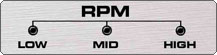
You can change the fuel curve with the faceplate buttons. This is
a simple adjustment that can move the fuel curve richer or leaner in
each area of the map. (Please refer to the paper installation guide
or adjustment video on the CD-ROM).
If
you have a Windows 95/98/ME/XP computer, you can upload alternate
maps or make changes to the existing map using the Control Center
software and serial port link cable supplied with your PC. (Detailed
Software tutorials and quick reference software screen shots are
available on the CD_ROM or web-site).
How do I get 100% optimization?
First ask yourself......Is it necessary?
You installed the PC, you noticed a positive
improvement and the most annoying problems like overheating, surging
or pinging have been eliminated. In this state you are probably
90-95 % optimized. Which for most is a Huge Improvement.
If you desire 100% optimization or you require a custom map for a
special application, you must select a Certified Dyno Tuning Center
or a Local dealer that has the proper equipment and training to
accomplish this for a reasonable cost and without damage to your
motorcycle.
Computer
Mapping
Dynojet
is in the process of selecting specialized dealers throughout the
country that can offer you this service. Dealers who have the proper
equipment installed and pass a detailed Power Commander Training
School at the Dynojet facility, will be given the distinction "Dynojet
Approved Power Commander Tuning Center" and will be listed on our
web-site.
Ignition
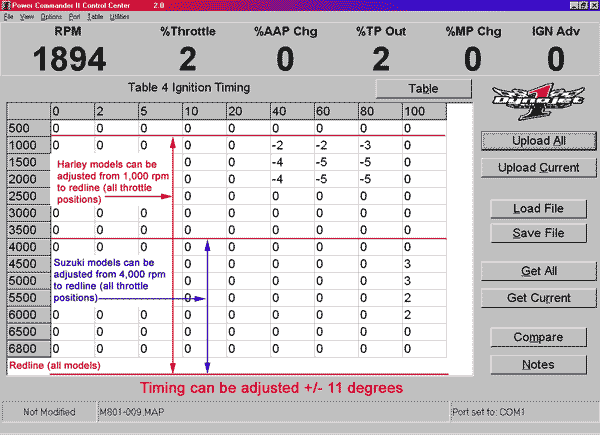
Power Commanders for some models can also control
the Ignition Curve. You can adjust the ignition curve for increased
part throttle response, increased peak power, or to eliminate
detonation. On most models the ignition curve is close to optimum
for "pump" fuel. In some cases it is possible to increase part
throttle torque by adjusting the timing. With high octane racing
fuel further gains can be realized at wide open throttle. Harley
Davidson models, in some configurations, can benefit from a
reduction in timing advance. If heavily loaded or during hot weather
the PC can be adjusted to eliminate the "pinging" that is so common
during these conditions.
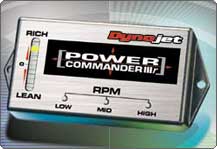
The Power Commander II was introduced in 1999 and
featured the latest surface mount electronics. Additional
features were added like the faceplate button adjustment.
The Power Commander II also allowed fuel and ignition
adjustment on select models. The PCII utilizes "sensor
offset" technology to adjust the fuel curve. Signals from
the various sensors on the bike are monitored by the PCII
and these signals are recalculated and sent to the ECU in
order to achieve the required fuel curve.
Power Commander III
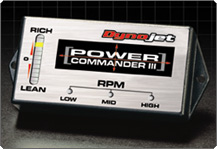
The Power Commander III was introduced in 2000 and is
externally similar to the PCII. The PCIII utilizes "direct
injector control" technology to control the fuel curve for
models that do not possess the appropriate sensors to allow
sufficient fuel adjustment using the PCII technology. The
PCIII takes the injector pulse from the ECU and changes the
pulse width signal to the injectors.This unit allows "Fuel
Only" adjustment.
Power Commander IIIr
The Power Commander IIIr was introduced in November 2000
and utilizes the same "direct injector control" technology
as the PCIII. The "r" version contains additional circuitry
and in some cases, additional connectors, which allow
Ignition adjustment as well as fuel adjustment. Ignition
adjustments can provide very positive results on the race
track, where factors like special fuel and highly tuned
engines are used.
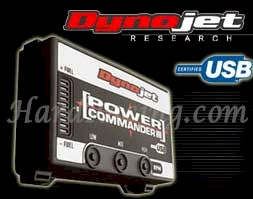
Power Commander IIIusb
The Power Commander IIIusb was introduced
in 2003 and utilizes the same "direct injector control" technology
as the PCIII. The USB (Universal Serial Bus) port provides an
instant, no-hassle way to connect the Power Commander module to a
computer. This model also features an expansion port for
add-on modules like Quick Shifters, And
ignition modules, which will allow you to adjust the ignition
timing.
Hassle free communication with new USB support
The new Power Commander USB will instantly and automatically
connect to the Power Commander Control Center software once it
is installed. Simply "power up" the unit and connect the
supplied USB cable to the computer and PCIII USB.
Automatic map retrieval upon connection
As soon as you connect the PCIII USB to the computer and launch
the software, the map installed in the PCIII USB will be
displayed.
Onboard notes storage
The PCIII USB stores the notes from the map in the onboard
memory. This makes it easy to see exactly which map is loaded.
The notes, just as the map itself, are automatically retrieved
upon connecting to the unit.
Individual cylinder adjustment
All PCIII USB units have a "cylinder trim" adjustment feature
that allows you to "offset" fuel to one or more cylinders.
Additionally, for advanced users, the PCIII USB allows
individual cylinder mapping. Now each cylinder can be mapped
individually throughout the entire rpm/throttle position range.
Enhanced "file compare" utility
The PCIII USB software now allows you to compare two map files
without the Power Commander connected. There is a numerical
display as well as a brand new graphical display.
Easier to use "button adjustment" mode
The button adjustment has been made easier by introducing a
"startup delay". This lets the user have enough time to start
the bike and then switch the PCIII USB into "button adjust"
mode. The ranges of the buttons are now displayed in the
software. Simply connect the unit to the computer and press one
of the buttons. Their ranges are shown on the screen.
"Expansion port" for future upgrades and accessories
The "expansion port" allows easy connection of such as our
new Quick Shifters & ignition modules, which will allow you to
adjust the ignition timing and LCD
SCREEN, and Gear Indicator .
9V "Power Up" adapter
Every PCIII USB comes with a FREE "power up" adapter which allows
users to program and interface with the Power Commander on their
desktop without being connected to the bike.
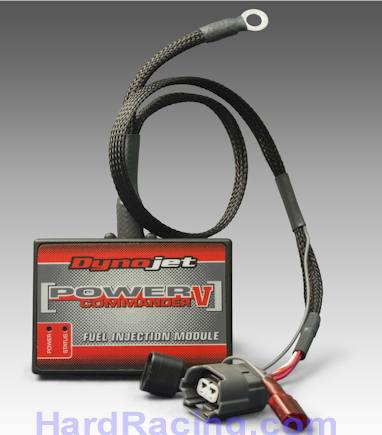
The new Power Commander V is
the latest in engine control technology from Dynojet. The PCV is very
compact, yet offers expanded features and options, with tremendous
control over your engine management system.
POWER COMMANDER V FEATURES
Smaller unit - less than ½ the size of PCIIIusb
Unit powers up via the USB - no need for 9v battery and adapter
2 position map switching as standard - switch not included
Gear and speed input as standard
5v analogue input as standard - boost, temperature, MAP etc
Enhanced Accelerator pump feature - vastly increased adjustment
Optional control unit to allow 8 injector mapping
Operates with Dynojet LCD display and Dynojet Quickshifter
New and improved software suite
Enhanced Quickshifter control - Adjustable kill time per gear and time
between shifts.
Twin CAN ports for integration and expansion
Improved mapping features
o PCV allows -100% to +250% fuel adjustment
User definable map break points, upto 96 x 96 break points (10 Throttle
position break points as standard, up from 9 for the PCIIIusb)
Individual mapping/maps per gear
Individual mapping/maps per cylinder
Individual mapping/maps against 5v input
For example a mapping per cylinder, per gear could result in 24
individual fuel maps
Harley Davidson PCV Units ONLY… Also Include:
o Fuel and timing control
o Rev Xtend
o "Warm Up" fuel adjustment (unit reads engine temp and allows
fuel/timing adjustments based on it)
o Software will display J1850 data from bikes stock ECU (this is data
such as temp, fuel pulse width, timing advance, spark knock etc.)
OPTIONAL ACCESSORIES
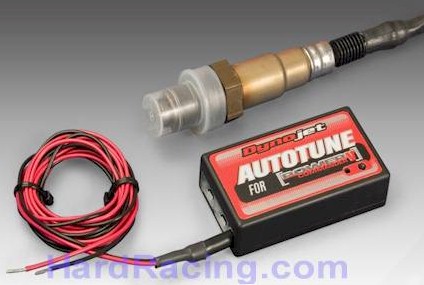
Auto Tune for Power Commander V
“Auto Tune” kits are available that include Wide Band O2 sensors and
control boxes. It will plug directly into the PCV and allow automatic
fuel adjustments.
Auto Tune can make a map for each gear it can map each cylinder
separately for each gear if needed. (basic settings would make one map
for all gears)
“Warm Up” fuel adjustment (unit reads engine temp and allows fuel/timing
adjustments based on it)
Each map cell is individually adjustable so you can specify an exact AFR
value for each area if needed. This allows the tuner/user to select
specific AFR targets for idle, cruise, and large throttle opening areas.
By doing this you can automatically tune the cruise area for best fuel
economy while at the same time achieve maximum power at wide open
throttle.
If Dyno Jet does not have the exact map for your combination of parts
you simply need to choose the closest one and let the Auto Tune kit do
the rest. (if you have an very heavily modified engine and/or short drag
pipes verifying your settings on a dynamometer is recommended).
SPORT BIKE AUTO TUNE KITS (AT200)
Retail : $250OUR
SALE PRICE - $219
HARLEY AUTO TUNE KITS
(AT100) Retail : $370
OUR SALE PRICE - $419
(includes 2 - wideband o2 Senors)



 Well
that can depend upon many things but what we can tell you is "The
perfect air/fuel ratio will ensure that the engine can produce the
maximum possible horsepower for that given combination". We must
also understand that a typical street rider spends a great deal of
time riding in part throttle conditions. Shown below are two graphs
of a motorcycle before and after installation of the Power Commander
. The top graph shows the horsepower curve accelerating at a 40%
throttle opening and the lower graph shows the corresponding air /
fuel ratio. You can see a large horsepower increase between the two.
The red curve shows a typical stock motorcycle with minor
performance modifications (slip-on exhaust). The blue curve shows
that same combination with the PC installed and you can see that the
line is nearly straight. So the rider will feel a large improvement
while riding the motorcycle and it is very possible that the peak
wide open throttle horsepower is unchanged.The correct air/fuel
ratio number (say 12.9:1 or 13.2:1) depends upon many factors like
combustion chamber design but what we want is that figure at every
point in the curve (straight line).
Well
that can depend upon many things but what we can tell you is "The
perfect air/fuel ratio will ensure that the engine can produce the
maximum possible horsepower for that given combination". We must
also understand that a typical street rider spends a great deal of
time riding in part throttle conditions. Shown below are two graphs
of a motorcycle before and after installation of the Power Commander
. The top graph shows the horsepower curve accelerating at a 40%
throttle opening and the lower graph shows the corresponding air /
fuel ratio. You can see a large horsepower increase between the two.
The red curve shows a typical stock motorcycle with minor
performance modifications (slip-on exhaust). The blue curve shows
that same combination with the PC installed and you can see that the
line is nearly straight. So the rider will feel a large improvement
while riding the motorcycle and it is very possible that the peak
wide open throttle horsepower is unchanged.The correct air/fuel
ratio number (say 12.9:1 or 13.2:1) depends upon many factors like
combustion chamber design but what we want is that figure at every
point in the curve (straight line).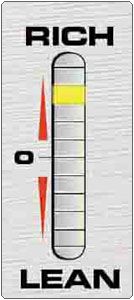
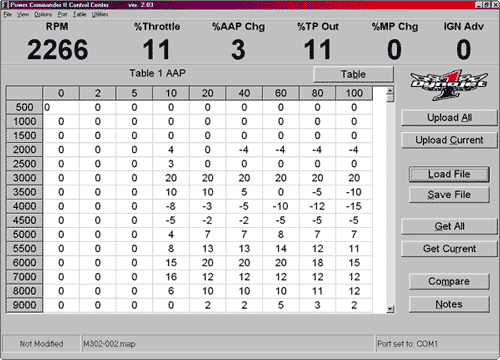 If
you have a Windows 95/98/ME/XP computer, you can upload alternate
maps or make changes to the existing map using the Control Center
software and serial port link cable supplied with your PC. (Detailed
Software tutorials and quick reference software screen shots are
available on the CD_ROM or web-site).
If
you have a Windows 95/98/ME/XP computer, you can upload alternate
maps or make changes to the existing map using the Control Center
software and serial port link cable supplied with your PC. (Detailed
Software tutorials and quick reference software screen shots are
available on the CD_ROM or web-site). Dynojet
is in the process of selecting specialized dealers throughout the
country that can offer you this service. Dealers who have the proper
equipment installed and pass a detailed Power Commander Training
School at the Dynojet facility, will be given the distinction "Dynojet
Approved Power Commander Tuning Center" and will be listed on our
web-site.
Dynojet
is in the process of selecting specialized dealers throughout the
country that can offer you this service. Dealers who have the proper
equipment installed and pass a detailed Power Commander Training
School at the Dynojet facility, will be given the distinction "Dynojet
Approved Power Commander Tuning Center" and will be listed on our
web-site.